DRYFTDocsDryft World Docs
Ctrl K
Quick Start
  • Quick Start Guide
Contents
  • About this manual
  • Technical Information
  • Product Label
  • Safety Basics
  • Cleaning with DRYFT
  • How to use DRYFT
  • What's in the box?
  • Know your equipment
  • Control Panel
  • Where to use DRYFT
  • Transporting your DRYFT
  • Storing your DRYFT
  • Maintaining Correct Posture
  • S-Motion
  • CORE-ion Battery Information
  • Charging your CORE-ion battery
  • Battery Indication Lights
  • Battery Health Information
  • Standard 12-Month Commercial Warranty
  • Preparing Cleaning Solution
  • Maintenance and Repairs
  • Magnetic Recovery Tank
  • MAGPlate and Pads
  • Squeegee Maintenance
  • Squeegee Blades
  • DRYFT Pads and Applications
  • Service and Repairs
  • Self Service Videos
  • Your Remote Support Team
  • DRYFT Warranty Information
Contents

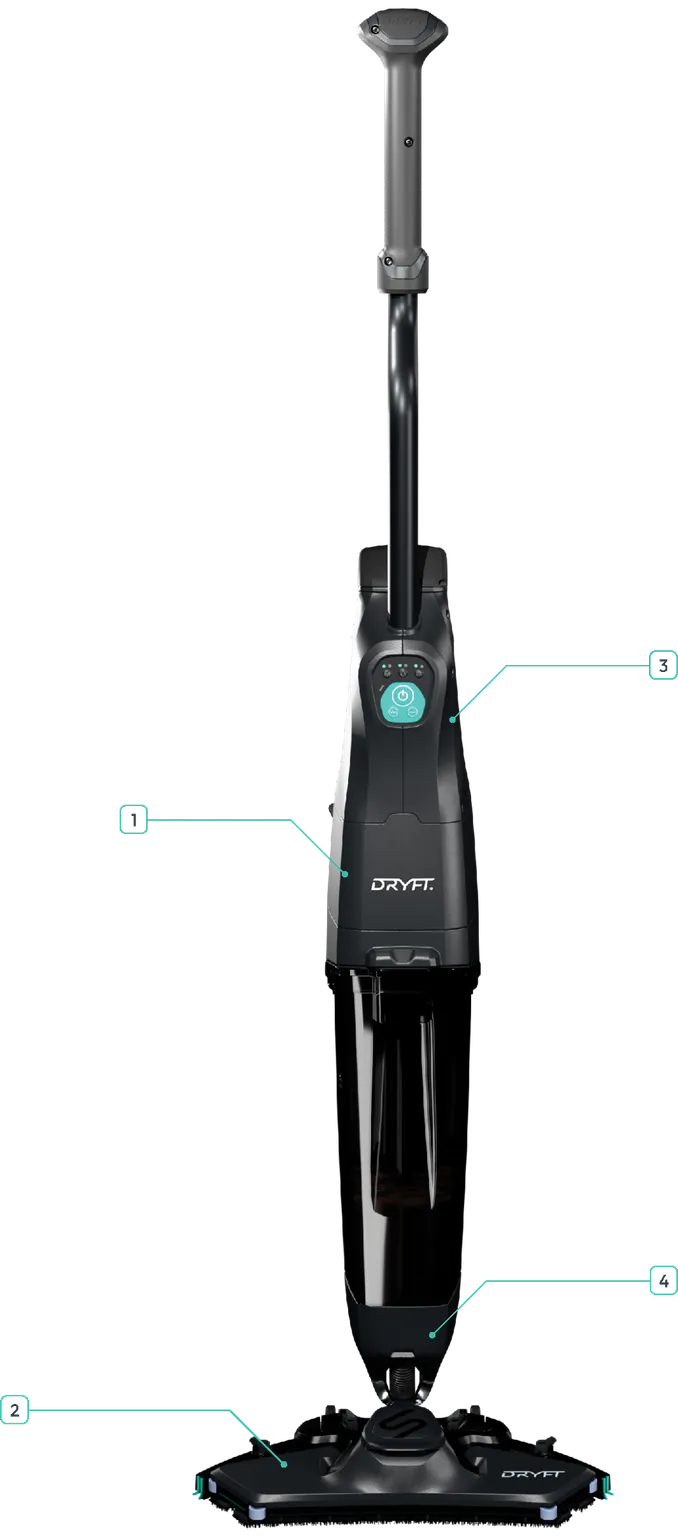
Self Service Videos

1Suction Motor
2Cleaning Head
3PCB
4Solenoid Pod
PreviousService and RepairsNextYour Remote Support Team
Last updated: 11/11/2025

© DRYFT 2026

Developer documentation