
Contents
Control Panel
DRYFT’s simple control panel has been designed to allow the user to easily switch between smooth floor mode and rough floor mode at the press of a button.
DRYFT has a stopping sequence. Suction boosts at the end of the cycle for three seconds, this is to help collect excess water within the cleaning pad.
To override this press ‘On/Off’ button again.
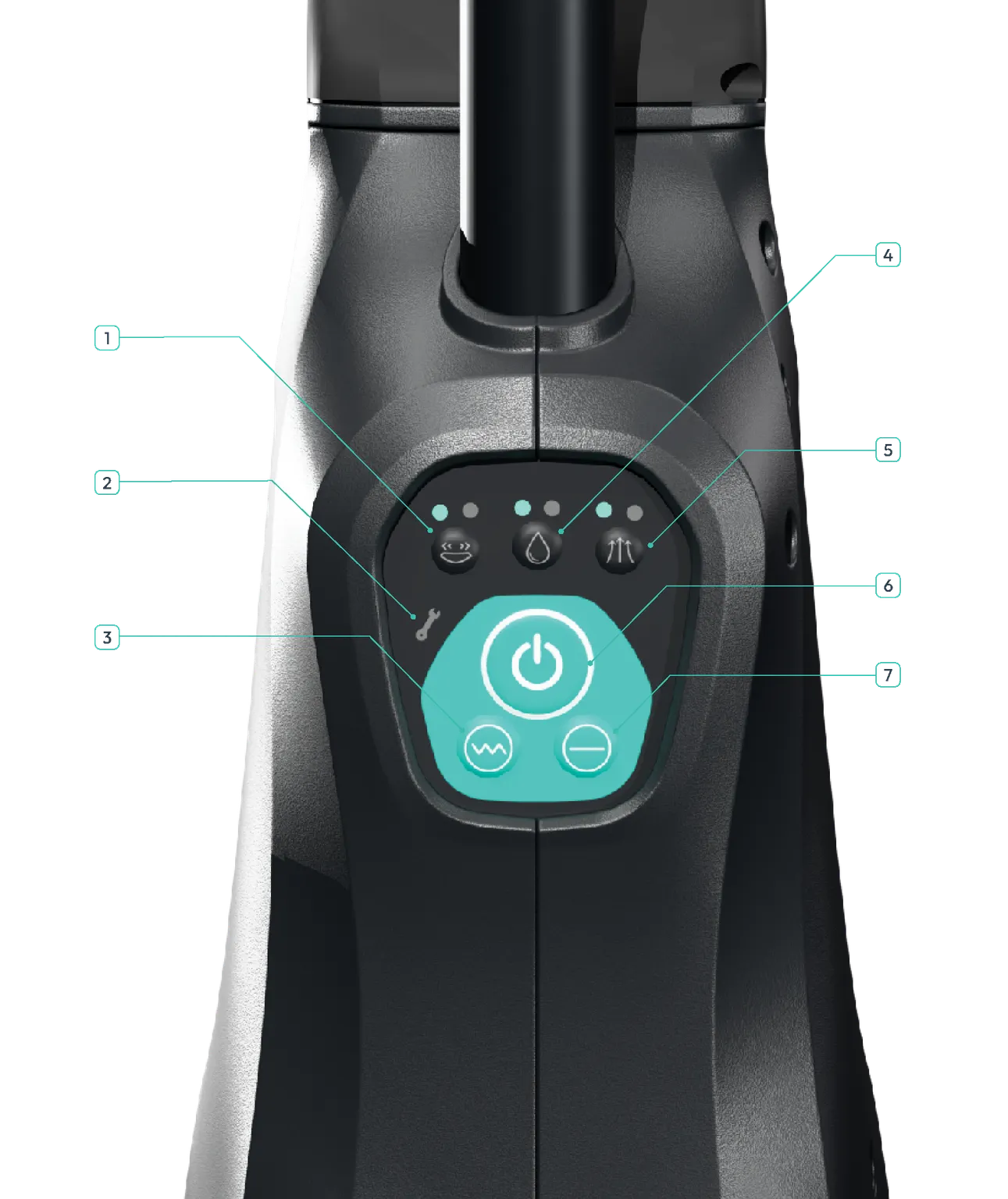
| 1 | Oscillation Speed One light for low speed, 3500rpm. Two lights for high speed, 4200rpm. |
|---|---|
| 2 | Service Indicator Flashes when a component experiences a fault. The related component light above will also illuminate. |
| 3 | Rough Floor Mode Select when using DRYFT on rough or textured floors. Suction speed is set to high to dry deep into texture/grout lines. 1 hour runtime. |
| 4 | Water Release Two lights indicate higher level of water release, one light indicates lower level of water release. High level 20 minute water runtime. Eco mode 40 minute water runtime. |
| 5 | Suction Power High speed for textured floors, low speed for smooth floors. Hold down for 5 seconds for boost mode. |
| 6 | On/Off Press to turn machine on and off. |
| 7 | Smooth Floor Mode Select when using DRYFT on a smooth floor, the suction will drop to low speed. 1 hour 15 runtime. |
Last updated: 11/12/2025